background preloader

Tools

Facebook Twitter

eXe Learning

STS : SimulTrain. Online tools and applications - Go2web20. Here’s a Free PowerPoint Template & Laptop Illustration. My guess is that some of the most common screen elements in elearning courses are computer monitors. They’re nice to use because contextually they fit elearning. And they’re great for holding the images and multimedia we use. There are all sorts of computer monitors available through the office online site. But sometimes it’s just easier to build what you need. Plus, it’s a great way to learn more of PowerPoint’s illustration features. In today’s post, I’ll show you how to build a laptop monitor inspired by the free laptop image file you can get from the psdGraphics site. Below is the tutorial.
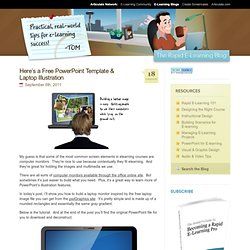
Click here to view the tutorial via Screenr. Here are some simple steps to create the laptop: Start with a rounded rectangle to create the top of the laptop. Bonus tip: Here’s a quick mockup of how you could use the laptop image in an elearning course. Click here to view the demo. As you can see, building your own illustrations in PowerPoint isn’t that difficult. Tidbits: Mind Map en ligne et Brainstorming - MindMeister. Claroline: environnement demo.