
Time Captis
Time Captis Inc. , a Batoi company, provides productivity app on SaaS model. The Time Captis app which is available on web, iOS and Android, helps users to manage their contacts, calendar, to-dos and notes. Using Time Captis pro subscription facilitates sharing, collaboration and communication among your business users or team, apart from tracking timesheets and invoices.
Manage Notes in Time Captis. You can add, view, edit and delete Notes for your Contact using Time Captis within your account.
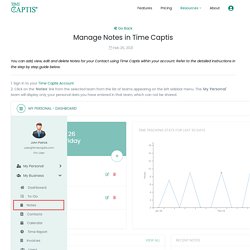
Refer to the detailed instructions in the step by step guide below. 1. Sign in to your Time Captis Account 2. Click on the ‘Notes’ link from the selected team from the list of teams appearing on the left sidebar menu. The 'My Personal' team will display only your personal data you have entered in that team, which can not be shared. 3. 4. Once you are done with, click on the ‘Save’ button as shown in Figure 3. Manage Your To-Do using Time Captis. Create, manage and keep track of tasks that you need to do daily in one place with Time Captis To-Do.
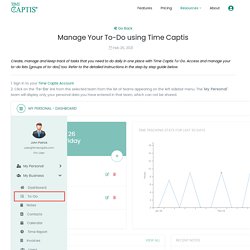
Access and manage your to-do lists (groups of to-dos) too. Refer to the detailed instructions in the step by step guide below. 1. Sign in to your Time Captis Account 2. Click on the ‘To-Do’ link from the selected team from the list of teams appearing on the left sidebar menu. Manage Teams in Time Captis. Time Captis Demonstrated at Mobile World Congress Americas 2018. TimeCaptis — Create An Account in Time Captis. TimeCaptis — New Success Page for Web Registrations. Quick Tips for Setting Up Your Time Captis Account in No Time. New to this whole time tracking and aren’t sure where to start from?
We are here to help you provide quick tips for setting up your TimeCaptis account faster. #1 Check out Our Help Resources TimeCaptis is an easy-to-use time tracking tool. But we also understand we may be a little biased since we are constantly using it as a part of our work. However, we have created a Resource full of searchable how-to-articles and videos to help you get the most from your TimeCaptis experience. #2 Set Your Personal Profile Data Make it easy on yourself.
. #3 Determine Access Rights Spend 5 minutes thinking if you would like to provide admin permission to any of your users, before tracking time. . #4 Utilize Document Upload If creating tasks and assigning them to your users immediately sounds like a hassle, upload a single document and share it among your users to save yourself some time. Accessing Team Feature on Time Captis Web App Is Easy Now. There have been several enhancements to the time management app.
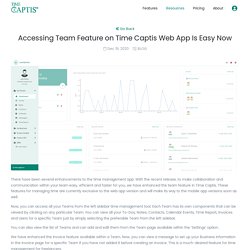
With the recent release, to make collaboration and communication within your team easy, efficient and faster for you, we have enhanced the team feature in Time Captis. These features for managing time are currently exclusive to the web app version and will make its way to the mobile app versions soon as well. Now, you can access all your Teams from the left sidebar time management tool. Each Team has its own components that can be viewed by clicking on any particular Team. You can view all your To-Dos, Notes, Contacts, Calendar Events, Time Report, Invoices and Users for a specific Team just by simply selecting the preferable Team from the left sidebar.
You can also view the list of Teams and can add and edit them from the Team page available within the ‘Settings’ option. We have enhanced the Invoice feature available within a Team. The Best Digital Note Taking App For You. The great thing about the note-taking app is that it allows you to capture ideas anytime, anywhere.
This is the reason why many professionals, freelancers and students prefer note-taking apps to sustain their passion and the flow of ideas. You can also count on note-taking as a skill and competency. Say, you're attending a concert, and want to take notes so you can write a review for your newsletter. 10 Tips for Better Time Management. Time Tracking Invoicing App — ImgBB. Time Management App — ImgBB. Time Management and Tracking – Time Captis is the answer for Freelancers to being super Productive. While I began to jot this down, there were a few straight questions that came to mind.
Did any of us ever imagined living life during and after a pandemic? Did we ever think of an invisible pathogen evading our lives like this? Did we ever anticipate that life will come to a halt and economies crash? Did we ever expect a pandemic to keep people confined at home like the way it did? A big NO will be my guess. Before we go further, I would want to share a staggering number with you. But to my mind, what happened in the last ten months or so has a brighter side to it as well. Freelancing suddenly appears to be a great career option, especially when you have a skillset that is in great demand. This is the so-called easy part. Imagine, yourself as the freelancing expert, with no dearth of assignments.
Imagine, as the project manager, you attempt to manage the progress of your project or assignment using excel sheets or just the calendar or notes app of your laptop or computer or mobile. Best Time Management App — ImgBB. TimeCaptis — TO-DO Management For a Student In between a... TimeCaptis — Best to do list app android...