

ROOMLE 3D/AR La aplicación de Roomle para Android le ayuda a crear los mejores diseños de interiores para la casa u oficina. Contamos con un inspirador catálogo de muebles en 3D con innovadoras características en línea que permiten efectuar compras y crear una imagen realista de cómo se verán los muebles en su casa, en tiempo real. Basta con presionar un botón para visualizar los muebles en Realidad Aumentada (RA) dentro de la habitación y comprarlos de inmediato. Se trata de una aplicación para crear y visualizar diseños en 2D, 3D y Realidad Aumentada. CATÁLOGO 3D QUE INSPIRAEl catálogo 3D ofrece una amplia variedad de accesorios y muebles, con una selección cada vez más grande. VISUALIZAR LOS MUEBLESCon tan solo presionar un botón, se puede seleccionar y visualizar muebles en Realidad Aumentada. COMPRAR MUEBLES – EL BOTÓN “COMPRAR AHORA”Seleccione el mueble perfecto y cómprelo de inmediato.
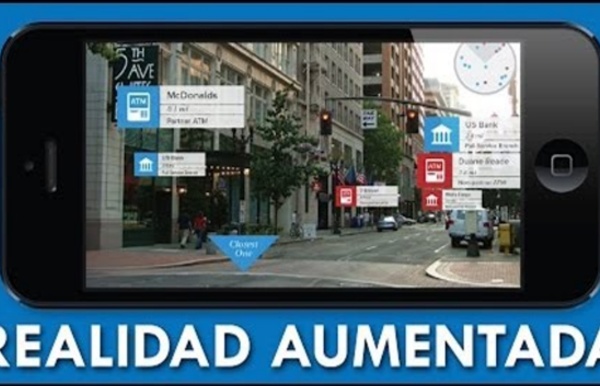
Qué es la realidad aumentada, cómo se diferencia de la virtual y por qué Apple apuesta fuertemente a ella Derechos de autor de la imagen Microsoft La realidad aumentada se ha popularizado de la mano de Pokémon Go, pero cada vez son más los gigantes tecnológicos que se interesan por ella. De hecho, para empresas como Apple tiene mucho más potencial que la realidad virtual. Su director ejecutivo, Tim Cook, lo dejó bien claro. "La realidad aumentada (RA) abarca más que la realidad virtual (VR), probablemente con diferencia, porque nos da la posibilidad de estar presentes y de comunicarnos, pero también de que disfrutemos de otras cosas a nivel visual", dijo en una entrevista con la cadena estadounidense ABC News. Hace unos días, durante su visita oficial a Japón, el empresario reiteró su visión y declaró que su compañía "apuesta por la realidad aumentada a largo plazo". Media playback is unsupported on your device ¿A qué se refiere? Mundo ficticio vs. mundo "real" Cómo la realidad aumentada está cambiando el mundo Derechos de autor de la imagen IKEA Derechos de autor de la imagen Getty Images
VISUAR REALIDAD Visuar is an Augmented Reality App of general purpose that you can use to show your projects and ideas.With "Visuar Augmented Reality" you can upload your own models and show in 5 minutes.Visuar is a generic visor that you can use for whatever you want, publicity, medicine, education, tourism, architecture, marketing, etc.Besides, with Visuar you can make advertising and marketing campaigns at very low cost.With the augmented reality leader App have: - Your own channel with your corporate image.- You can move, rotate and escalate in all perspectives.- Add video, sounds, animations and video textures to your models.- Change the textures in real time.- Add personal targets in real time.- Take photos and send by social networks and email.- You can center the view int the model and saw the interior. … and it´s only the beginning.You can have your own channel now in for FREE.Would you like to try it right now?
Quickstart for Google VR SDK for Android | Google VR | Google Developers Use the Google VR SDK to build apps for Daydream and Cardboard. This guide shows you how to set up Android Studio for Google VR development and use the Treasure Hunt sample app. Set up your development environment Hardware requirements: Software requirements: Android Studio version 2.3.3 or higher.Android SDK 7.1.1 'Nougat' (API level 25) or higher.In Android Studio, go to Preferences > Appearance and Behavior > System Settings > Android SDK (includes samples) to review or update installed SDKs.Google VR SDK for Android version 1.80.0 or higher. Open the Google VR SDK project in Android Studio Extract the downloaded Google VR SDK into a convenient location.Open Android Studio and select Open an existing Android Studio project. Prepare your device Build and run the Treasure Hunt sample app Connect your phone to your machine using a USB cable.In Android Studio, select Run > Run... and select the samples-sdk-treasurehunt target. For more details, see the Treasure Hunt sample code walkthrough.
7 Best Educational Virtual Reality Apps By Shane Haumpton Virtual reality (VR) has so much potential as a tool that can take learning beyond the conventional classroom. With touted benefits such as enhanced engagement, improved retention, and the ability to block out common classroom distractions, this simulation-based technology is being predicted as one of the top emerging learning trends in 2017. But despite the clear advantages, we have yet to see the widespread use of virtual reality in schools. According to the findings of a survey conducted by Extreme Networks in June 2016, 77% of 350 higher education and K-12 schools had not used VR in the classroom, and the top reasons for not utilizing the technology, according to 43% of the respondents, were the high cost of equipment and the difficulty in implementation. However, the future of VR in the education sector isn’t bleak at all. The creative use of VR technology as a storytelling tool is also expected to further engage young learners. 1. 2. 3. 4. 5. 6. 7. For more, see:
Augmented Reality in 10 Lines of HTML – ARjs Do you want to do Augmented Reality on the web ? You can now do it in 10 lines of HTML! Seriously! Let me walk you thru the code, it’s crazy simple. We released AR.js recently. You can experience efficient augmented reality for the web directly on your phone without installing any applications. Let’s break it down line by line. Including the Libraries First, you include a-frame, an effort started by MozillaVR to build VR experiences. Defining the Body In this step, it’s all business as usual. Creating a 3d Scene Next, we are going to create our a-frame scene. Adding Simple Content Once we have created the 3d scene, we can start adding objects to it. Adding the AR Camera In this last step, we are going to add a camera. Congratulations! Check out this video version I made of the tutorial:
Virtual Reality (VR) App Development Virtual reality (VR) is one of the hottest emerging technologies in the entertainment industry today. Millions of VR devices have been sold in the US alone, but most software developers have no formal training on the technology. This Professional Certificate program will teach you what VR devices exist, how VR technology works, and how to write software, often called VR experiences, for it. You will learn effective 3D interaction techniques to use VR applications, how to write VR applications in WebVR and Unity 3D, and what features make a VR application successful. You will also learn the required mathematics for successful VR applications and how computer graphics are rendered onto a screen. The final course in this program will allow you to apply the material learned in the previous courses to create your own VR app. This program will provide you with a strong foundation to develop VR apps in all areas VR is used, including entertainment and gaming.
How you can become an AR/VR developer This blog post was written under the Pusher Guest Writer program. The Augmented Reality (AR) and Virtual Reality (VR) industries are still in its infancy, however, this is why now is the perfect time to learn how to create content for these technologies. They need it to make the jump to the next level of adoption. Luckily, from a developer standpoint, the skills needed to get into AR and VR are very similar and the barriers to entry are still relatively low. The Most Important Skill You Need No matter whether you’re a newbie who is starting with programming or a veteran with years of experience in the field, the main skills you’ll need to become an AR/VR developer are in the 3D area. Hardware Augmented/Virtual reality (and 3D development in general) demands high-end hardware. Processor: Intel Core i5-4590 or AMD FX 8350Graphics: NVIDIA GeForce GTX 1060 or AMD Radeon RX 480Memory: 8 GB RAMPorts: 3x USB 3.0Operating System: Windows 7 or superior Virtual Reality Devices Make or Find Assets?
Los cinco mejores emuladores de Android para PC Son cada vez más los emuladores de Android para PC que están rindiendo a un gran nivel para ofrecer al usuario opciones muy potentes. Dado el cada vez mayor acercamiento funcional entre ecosistemas móviles y de escritorio, es común que se intenten buscar formas de afianzar más esta relación llevando apps a sus equipos de sobremesa. La llegada de Windows 11 también ha incrementado las posibilidades a la hora de correr, sin complicaciones, nuestras principales utilidades y juegos dentro del entorno computacional. Lo que hace un tiempo era terreno exclusivo del kit de desarrollo de Android o a lo sumo del pionero Bluestacks ha desembocado en la proliferación de herramientas análogas a esta última. Estos programas permiten ejecutar apps Android en PC adaptando el control a teclado y ratón y ofreciendo un enorme grado de compatibilidad y rendimiento. Bluestacks Con el paso de los años, Bluestacks ha ido manteniéndose como uno de los mejores emuladores de Android para PC. NoxPlayer LDPlayer
What are the best platforms/tools for making a geolocation-based Augmented Reality app? Scavenger Hunt Clues - How to Write Scavenger Hunts Writing your own scavenger hunt clues can be a lot of fun, especially when you vary the types of clues you create throughout the hunt. These tips and ideas are adaptable for any... agethemeevent ... and will help spark your creativity the next time you plan a clue based scavenger hunt. Scavenger Hunt Clues Using Pictures A. Use this idea in a hunt that moves from clue to clue or create a list of pictures whose locations need to be found within a certain time period. B. You can photograph the location yourself or use any graphic that depicts the hiding location (eg. a picture of a fridge can be drawn, photographed, clipped from a magazine, or found online). Scavenger Hunt Clues Using Puzzles A. Rebus clues can be made as difficult or as easy as you wish. B. For children, it's best to include the code needed to decipher the clue along with the clue. A variation for an adult clue would be to use the numbers on a telephone. C. Scavenger Hunt Clues Using Rhymes Scavenger Hunt Clues Using Letters A.
Create Your Own Google Expeditions To coincide with the BETT Show Google announced a new beta program that will enable schools to create their own Google Expeditions. The latest iteration of the Google Expeditions Pioneer Program will provide schools with all of the equipment required to capture 360 images and to create their own immersive Google Expeditions. The announcement didn't say this, but I will guess that the Google Expeditions Pioneer Program will provide some type of professional development or training. The application to become a part of the new Google Expeditions Pioneer Program is now open. Other ways to create your own virtual reality imagery and tours: In the Practical Ed Tech Tip of the Week I featured a free program called Patches that enables anyone to build virtual reality tours. Google's Cardboard Camera App will let you create narrated panoramic images to view in virtual reality headsets. You can get the Cardboard Camera app for Android here and the iPhone version here.
Patches – Explore, Create and Publish VR on the Web WPanorama - Download panoramic pictures Gazebo Lake, Green Mountain Falls (Colorado, USA) © Vic Garcia 10 images with tripod, stitched with Autopano, Canon SX1 Dimensions: 5'639x768 pixels Download size: 1.07 Mb This panorama is also available in high resolution (21'016x2'862 pixels, 14.58 Mb) Downloaded 1'976 times in 3'124 days (15 over the last ten days) Last time today Gorgeous pictures of Vic's trips on his site www.garciatrips.com,as well as astounding videos of wild animals on youtube