

The Four Things Students Need to Create Good Book Trailers Creating book trailer videos is a great alternative to a traditional written book report assignment. In a book trailer video students highlight their favorite elements of a story and try to entice viewers to read the book themselves. Much like a movie trailer that tries to get viewers to watch the full movie, a book trailer should give viewers just enough to be interested in the full story without giving away the conclusion to the story. If you have heard of book trailers and wanted to try having your create book trailers, here are the four things they'll need to get started after reading a book. A script/ outline: Before I let students start to assemble a video, I make them write a script or outline for the video. Images: Your students will want to use pictures in their videos to represent key elements and characters in the books they have read. It's not always possible for students to use images they own. Many of the aforementioned video editing tools offer sound effects too.
Poof! Paper Handouts are Digital - Teacher Tech While at an event recently the speaker handed out a paper handout. After her presentation, some of the audience members were asking if the handout was available digitally. Using Google Keep I was able to digitize the handout and distribute it through Google Classroom in seconds. Google Keep I am a big fan of Google Keep. Take a Picture One of the things I can do with Google Keep is take a picture into the note. Grab Image Text In Google Keep if you tap on the picture in the note it isolates the picture. Share Click on the horizontal 3 dots icon in the lower right and choose “Send.” Google Doc The Google Doc contains a picture of the handout and the text extracted from the handout. Google Classroom My mantra is to get it in Google Drive. paper to digital paper to digital
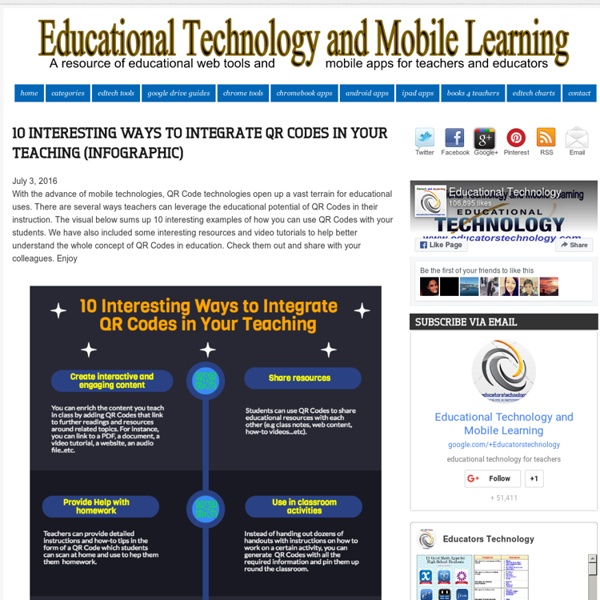
Herramientas: Códigos QR > Cómo enriquecen los aprendizajes los Códigos QR Los Códigos QR crean un enlace fácil de crear y de leer entre objetos y/o lugares e información relativa a estos. Los teléfonos móviles se están convirtiendo en dispositivos que ofrecen funcionalidades útiles para el aprendizaje ya que la mayoría de los teléfonos actuales permiten tomar fotografías, enviar mensajes de texto, navegar por Internet y capturar y decodificar códigos QR. Las actividades de aprendizaje en las que se utilizan dispositivos móviles posibilitan el aprendizaje dentro y fuera del aula, más allá del tiempo y el lugar. Según Suzie Boss y Jane Krauss, “tener en cualquier momento y en todo lugar acceso a información, a herramientas de productividad basadas en la Web y a múltiples opciones de comunicación, es especialmente apropiado para el aprendizaje por proyectos”. Cuándo utilizar Códigos QR en procesos educativos Los docentes pueden utilizar Códigos QR para: Las instituciones educativas pueden implementar Códigos QR: Nivel:
Metodologie Attive vs Lezione Frontale: di Cosa ha Bisogno la Scuola? L’attuale situazione della scuola italiana sta vivendo un interessante momento di transizione. Da un lato il ricambio generazionale dei docenti sta portando in cattedra insegnanti sempre più giovani, sebbene l’età media dei docenti italiani resti una delle più alte in Europa, dall’altro il Miur col Piano Nazionale Scuola Digitale sta dando un notevole e meritorio impulso alla formazione in servizio. Sullo sfondo ci sono i cosiddetti “nativi digitali”, ossia quei giovani che, nati nel nuovo millennio, utilizzano quotidianamente le tecnologie, seppure molto raramente in modo consapevole ed efficace. A queste nuove generazioni si rimprovera spesso una bassa attitudine al ragionamento astratto e si imputa loro uno scarso mantenimento della concentrazione per più di qualche minuto. È davvero così avvilente il quadro? Pensiamo che tutto ciò non abbia inciso in modo irreversibile sui loro pattern mentali? Facciamo un esempio: la spedizione in Gallia da parte di Giulio Cesare.
Learning tools selector Audiences Teachers, Students, Age restricted, Community About Allows users to upload, access, organise, edit and share photos and videos. Technical Requirements Use any device with an internet connection. Advice No technical experience is required. Tutorials See Help for Flickr. Help Visit the Flickr help forum and the FAQ page. Get started Sign up for a free account, upload some photos or videos and select an audience to share them with. Cost Free -$ Go to App RECETA 2.O: BIBLIOTECA DIGITAL Libros con códigos QR. ¿Cómo hacer de nuestra biblioteca de aula una biblioteca 2.0? Receta 2.0 para tu biblioteca de aula. La propuesta que os traemos hoy, es incluir códigos QR a la colección de libros de vuestra biblioteca de aula. Para fomentar entre otros aspectos la animación lectora. Un código QR (quick response code, «código de respuesta rápida») nos permite almacenar información en una matriz de puntos . Podemos acceder a este información a través de un Smartphone, Tablet o PC , mediante una aplicación que lea la información almacenada al enfocar la imagen del código. Podemos cifrar URL, SMS, TEXTOS, EMAIL, NÚMERO DE TELÉFONO, TARJETA DE VISITA. En la sección de Cocina de vanguardia 2.0 os facilitaremos en breve una completísima lista de generadores y lectores de QR y os contaremos como crear códigos QR con vuestros alumn@s y como personalizarlos ( colores, logotipos...). Los alumn@s grabarán una recomendación lectora del libro que más les guste de la biblioteca de aula.
Seguite il mio Consiglio: Abbandonate la Lezione Frontale Quante volte nel fare il nostro mestiere ci chiediamo come possiamo rendere la nostra didattica più piacevole e non noiosa in modo da coinvolgere tutti i nostri alunni? Spesso si perde di vista il vero obiettivo che ci ha spinto a diventare insegnanti e di questo ne soffre la classe, la nuova scuola apre le porte verso una didattica laboratoriale che rende le lezioni molto più stimolanti e sortisce dei buoni risultati. In classe vi sono tanti bambini che hanno diversi bisogni e una classica lezione frontale non riuscirebbe a coinvolgerli. Ecco perché suggerisco alle mie colleghe di rendere le lezioni più stimolanti e piacevoli grazie ai progetti. Assunta Rita Belfiore, insegnante
The Definitive Guide to Educational Technology Resources Last updated: Jan. 11, 2017 I love teaching, and I'm enthusiastic about technology. When one of my colleagues (also a K-12 teacher) reached out and asked me to compile a list of educational technology tools, I said "that sounds like a fantastic idea." A quick research reveals that there isn't a lack of EdTech tools on the Internet. Therefore, I figured it would be great to curate a comprehensive list of the web's best EdTech resources that classroom teachers can really benefit. If you are also a teacher or a supporter of education technology, the best way to show your appreciation is to share this guide with others who may be interested in the topic. Disclosure: Neither AnySoftwareTools nor I am affiliated or sponsored by any of the persons or organizations mentioned in this article. Chapter 1: Software & Web Tools EdTech is the use of technology in the form of hardware, software, and the Internet to enhance learning, pedagogy, and instruction. Chapter 2: Mobile Apps
54 IDEAS PARA UTILIZAR LOS CÓDIGOS QR EN EDUCACIÓN Cada día se usan más los códigos QR y surgen más ideas para sacarles partido. Aquí dejo algunas que pueden sugerir aplicaciones en educación: Apuntar direcciones de Internet sin necesidad de recurrir al lápiz y papel en el caso de que los asistentes no tengan acceso directo al ordenador en ese momento (conferencias, charlas, encuentros, etc.) Fuentes:
Create a Startup Culture in Your Classroom Many educators that seek to incorporate design thinking and collaborative processes into teaching and learning are looking to the unique culture exemplified by startup companies. Both nimble and energized, today's startups are redefining how "work" looks by championing disruption in innovation and enterprise. Fueled by passion and charged with a desire to make a positive impact in our world, startups creatively incorporate voice and choice, flexibility, personality, and fun into learning and working environments. By embracing these business models for learning, teachers are taking on this entrepreneurial, DIY spirit and transforming the process of making meaning and searching for knowledge. Schools and educators who choose a startup culture can essentially place a renewed focus on the role of the learner by empowering students to find authentic and meaningful problems and to search for solutions through design activities and iteration. Use of Space Intentional Designs Building Identity
Collaborative Tools Skip to main content Create interactive lessons using any digital content including wikis with our free sister product TES Teach. Get it on the web or iPad! guest Join | Help | Sign In cooltoolsforschools Home guest| Join | Help | Sign In Home Presentation Tools Collaborative Tools Research Tools Video Tools Slideshow Tools Audio Tools Image Tools Drawing Tools Writing Tools Music Tools Organising Tools Converting Tools Mapping Tools Quiz and Poll Tools Graphing Tools Creativity Tools Widgets File Storage & Web Pages Other Helpful Sites Creative Commons Teacher Resources Apps for Mobile Devices (NEW - Under Construction) Tools index for this site A-Z email Lenva <a href=" Live Blog Stats</a> Actions Help · About · Blog · Pricing · Privacy · Terms · Support · Upgrade Contributions to are licensed under a Creative Commons Attribution Share-Alike Non-Commercial 3.0 License. Turn off "Getting Started" Loading...