background preloader

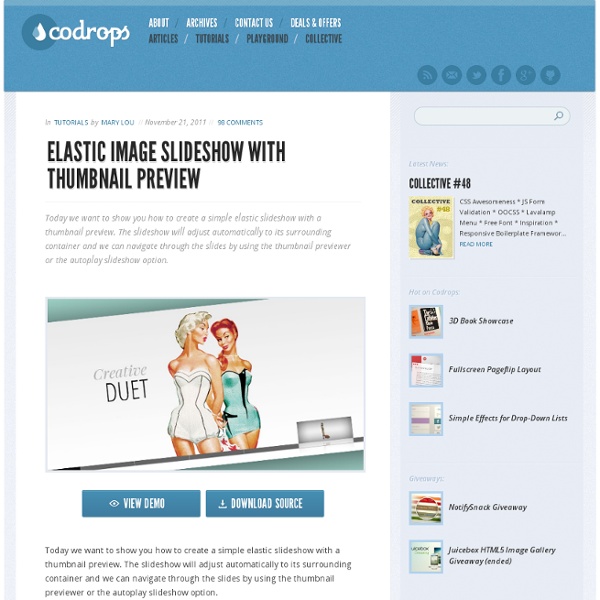
Elastic Image Slideshow with Thumbnail Preview

Elastic Image Slideshow with Thumbnail Preview
Today we want to show you how to create a simple elastic slideshow with a thumbnail preview. The slideshow will adjust automatically to its surrounding container and we can navigate through the slides by using the thumbnail previewer or the autoplay slideshow option. View demo Download source To make this slideshow responsive, we will use a mixture of JavaScript and CSS techniques. The fabulous photography used in the demo is by Bartek Lurka and it is licensed under the Attribution-NonCommercial-NoDerivs 3.0 Unported License. So, let’s do it! The Markup We will create two unordered lists, one for the main slider and one for the thumbnail navigation beneath the large image. The list for the thumbnail preview navigation will contain an absolute element (the first list element with the class ei-slider-element and the thumbnail list elements which consist of an anchor and an image (the thumbnail). Now, let’s add the style. The CSS First, we will define the style for the main wrapper. The JavaScript

jQuery JavaScript Simple FadeSlideShow by Pascal Bajorat » Media Queries in SVG images Cloud Four Blog “Wait? What was that Bruce Lawson just said?” That was my reaction last week as I listened to the audio from Bruce’s presentation at Responsive Day Out conference. What had Bruce said that blew my mind? It was the fact that you can embed media queries inside SVG images. Maybe this is common knowledge for everyone else, but I was stunned by the news. I recommend starting the video at the 3 minute 25 second mark. The really cool thing about the way media queries work inside SVG is that they react to the viewport of the image itself, not the viewport of the browser. Here is the source from one of the example images that Andreas uses: SVG images with media queries embedded in them seem perfect for the responsive images art direction use case. The examples that Andreas shows in the video can be found at: And I would be remiss if I didn’t also share his post from 2009(!) Finally, I highly recommend listening to all of the audio from Responsive Day Out.

Tiny Circleslider: A lightweight circular carousel for jQuery What is it? Tinycircleslider is a circular slider / carousel. That was built to provide webdevelopers with a cool but subtle alternative to all those standard carousels. Tiny Circleslider can blend in on any wepage. It was built using the javascript jQuery library. Features IOS and Android support. Need support or custom features? Anything is possible! Examples $(document).ready(function(){ $('#circleslider1').tinycircleslider();}); Note: There is no lightbox natively in tiny circleslider for this example fancybox was used. To get a better understanding of how it all comes together I made a (corny) styled example. Constructor Properties Methods Events Usage The image below displays how you calculate the radius of your circleslider.

Fancybox - Fancy lightbox alternative Blog – Tutorials – Online Training Recently I’ve been using a really awesome framework called Bootstrap to put small websites together. In this article, I’m going to guide you through the basics of the Bootstrap installation process, and how the Bootstrap framework can be customized for a responsive web design. The end result of this tutorial will be a custom Bootstrap website (you can see the final website here). If you prefer to skip the basics and get right to the Bootstrap code, you can download the code directly from GitHub. Why Bootstrap? Bootstrap is a framework that provides an easy-to-use 12-column grid system for a 940 pixel wide container as well as a fluid layout grid that adjusts to the size of a browser. To put the benefit of using Bootstrap into perspective, consider how you go about building a website. Imagine how much quicker and easier your web build could be if you used Bootstrap to help you organize everything from designing site structure to defining site maps and building column structures. Base CSS

Making a Beautiful HTML5 Portfolio Martin Angelov In today’s tutorial we will be making a beautiful HTML5 portfolio powered by jQuery and the Quicksand plugin. You can use it to showcase your latest work and it is fully customizable, so potentially you could expand it to do much more. The HTML The first step is to write down the markup of a new HTML5 document. index.html <! In the body, there are a number of the new HTML5 elements. The #stage unordered list holds our portfolio items. You can put whatever you want in these li items and customize the portfolio further. Beautiful HTML5 Portfolio with jQuery The jQuery What the Quicksand plugin does, is compare two unordered lists of items, find the matching LIs inside them, and animate them to their new positions. First we need to listen for the ready event (the earliest point in the loading of the page where we can access the DOM), and loop through all the li items detecting the associated tags. script.js – Part 1 Each tag is added to the itemsByTags object as an array. Great!

Les meilleures galeries photo jQuery Image Flow Inspiré du cover flow d'apple. Gère les touches clavier et la molette. Space Gallery Passe à l'image suivante en cliquant dessus avec un fondu et agrandissement. Gallery View Nombreux paramètres, plusieurs affichages possibles : caroussel lighbox Easy Slider Une seule transition : glissement de l'image. Très simple, configurable par css Jquery Cycle De nombreuses transitions entre les photos, assez originales. SuperSized Plein écran JQZoom Zoom en déplaçant la souris CrossSlide Déplacements par zoom dans l'image ou kenburn + transitions par fondus HighSlide Ouvre la galerie dans une boite modale en cliquant sur une image. Très nombreux paramétrages : voir l'éditeur. Gère aussi toutes sortes de boite modale pour y afficher de l'innerHTML, ajax, iframe et flash. Photo Stack Affiche des catégories d'images, et quand on clique sur une ça ouvre le "paquet" d'images correspondante. Voir la démo Thumbnail-Scroller Pas de gestion d'agrandissement de la photo, il faut rajouter une floatbox. Voir la démo

The Overflow Pattern The overflow pattern is a technique used in fluid web designs to expose more content as screen real estate becomes available. Typically seen in carousels and data tables, the overflow pattern allows content to remain compact for small screens while still capitalizing on additional screen real estate. The benefits are obvious. Exposing more content, especially for an e-commerce site like Amazon, means more chances for users to see something they’d like to buy. Also, a common complaint with regards to mobile-first responsive design is that large screen versions of mobile-first designs look stark and vacant. Considerations Make it obvious – Many users won’t know more content exists unless you provide explicit hints or controls. In the Wild Demos and Resources

Creating an iOS-like Home Screen with CoffeeScript Martin Angelov Today we are going to create an iOS-like home screen using CoffeeScript – a new JavaScript based language, and the jQuery library. CoffeScript has a clean syntax that lies somewhere in between Ruby and Python. If you haven’t used any of them, don’t worry – it is not required. However you will need to be familiar with JavaScript so you can better understand the concepts behind the language. We are also going to use the Touchable plugin, so we can listen for touch-based events. First, what is CoffeeScript? CoffeeScript is a neat programming language meant to enhance the good parts of JavaScript, while working around the not so good. CoffeeScript works in every browser out there, and is compatible with all your existing JavaScript code (including libraries like jQuery and plugins). iOS -like Home Screen with CoffeeScript The HTML Lets start with the HTML markup of our iOS-like home screen. index.html <! The #mask div shows only one screen at a time with overflow:hidden. The iOS Dock

Top 14 jQuery Photo Slideshow / Gallery Plugins | Chicago Web Design jQuery is becoming present in more Web 2.0 sites. jQuery slideshows or galleries take a grouping of images and turn it into an flash-like image/photo gallery. Here is a list of top options available for your website’s photo gallery. Galleria Galleria – Galleria is javascript image gallery written as a plugin of jQuery. It uses simple html list to load the images on by one into a larger canvas. jQuery Multimedia Portfolio jQuery Multimedia Portfolio – Display your portfolio items in a horizontal gallery view. Space Gallery Space Gallery – Animate your images and display them as a gallery in space effect much like Apples time machine. Jquery Slider Gallery jQuery Slider Gallery – Rotate your images in similar effect as on Apple’s website. jQuery jsGallscroll Plugin jQuery jsGallscroll Plugin – jQuery Gallery Scroller (jqGalScroll) takes list of images and creates a smooth scrolling photo gallery scrolling vertically, horizontally, or diagonally. Jquery Cycle Plugin EO Gallery Slideviewer Pirobox

Blogs - Internet blog - BBC TV Channel Homepages: Responsive Design Timeline Portfolio Timeline is a jQuery plugin specialized in showing a chronological series of events. You can embed all kinds of media including tweets, videos and maps, and associate them with a date. With some design tweaks, this will make it perfect for a portfolio in which you showcase your work and interests. The HTML Timeline comes with a light colored theme by default. First, let's look at the basic layout of the page: index.html <! In the head section, we have the plugin's stylesheet - timeline.css, and styles.css, which will hold our customizations. When we call the plugin, it will search for a div on your page with the ID of timeline. <div class="container main" id="timeline"><div class="feature slider" style="overflow-y: hidden;"><div class="slider-container-mask slider-container slider-item-container"><! As we will be modifying the CSS of the timeline, the fragment above will give you a better idea of the customizations. The jQuery The init method takes single argument - the data source. The CSS

Pirobox Extended V.1.0. jQuery plugin Hello and welcome, this is an advanced version of pirobox, I implemented a few things more than the previous version. One of the most important things is the ability to open any kind of files, from inLine content to the swf files, from simple images to pdf files. Other things are: automatic image resizing and drag and drop. Browser compatibility = FireFox 2+, Opera9.5+, Chrome, Safari (Mac/Windows),IE 7+. I really hope that my script Pirobox can be fun and usefull for you. Enjoy the code with jQuery Lorem ipsum dolor sit amet, consectetur adipisicing elit, sed do eiusmod tempor incididunt ut labore et dolore magna aliqua. Lorem ipsum dolor sit amet, consectetur adipisicing elit, sed do eiusmod tempor incididunt ut labore et dolore magna aliqua. Lorem ipsum dolor sit amet, consectetur adipisicing elit, sed do eiusmod tempor incididunt ut labore et dolore magna aliqua.

Chris Butler on Responsive Design at UCDA Design Summit Last month I spoke at the UCDA Design Summit — called The Empowered Designer — in Asheville, NC. I did two sessions, both on responsive design. This is the first part, in which I focused on some of the high-level, strategic considerations behind responsive. What's below does omit some of the individual slides; if you want to see the original slide deck, I've put it up at SpeakerDeck.com. (Oh, and in part 2, I got in to the nitty gritty. Introduction How many of you were making websites in the 90s? This shift comes at the urging of new software and hardware, again, just like many of the others. So that's why we're here. That's why I'm calling today's session Responsive Design at 10,000 Feet. I don't know why I just said that. Moving on. What we'll cover. What we won't cover? Incidentally, how many of you collaborate with developers to get your work done? Ok, good to know. And opinion, by the way, is the perfect segue to something I wanted to briefly mention before we dive in any further:

Related: