
Use Special Text Boxes on Your Class Website to Alert Parents and Students to Important Information. We love WordPress.
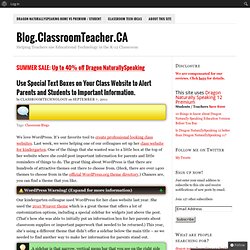
It’s our favorite tool to create professional looking class websites. Last week, we were helping one of our colleagues set up her class website for kindergarten. One of the things that she wanted was to a little box at the top of her website where she could post important information for parents and little reminders of things to do. The great thing about WordPress is that there are hundreds of attractive themes out there to choose from. (Heck, there are over 1400 themes to choose from in the official WordPress.org theme directory.) WordPress Warning! WordPress Warning! Our kindergarten colleague used WordPress for her class website last year. A sidebar is that narrow, vertical menu bar that you see on the right side of websites (including ours). How to create a message box using HTML and CSS code With a little bit of HTML and CSS knowledge, we were able to create a message box inside a regular WordPress post following Janko Jovanovic’s instructions here.
Google Apps Education Training Center. Media College - Video, Audio and Multimedia Resources. Embed Links/Files in a Promethean ActivInspire Flipchart. The 35 Best Web 2.0 Classroom Tools Chosen By You. 100 Web 2.0 Tools Every Teacher Should Know About 44.24K Views 0 Likes We're always trying to figure out the best tools for teachers, trends in the education technology industry, and generally doing our darnedest to bring you new and exciting ways to enhance the classroom. But I wanted t... 20 Free and Fun Ways To Curate Web Content 23.98K Views 0 Likes. More Than 30 PowerPoint Tips from the PowerPoint Pros! A lot of rapid elearning hinges on PowerPoint.
That means your success building courses is influenced by how well you know PowerPoint. To help you learn more about PowerPoint I pulled together a solid list of PowerPoint resources. From The Rapid E-Learning Blog Here are a few posts that cover some of the essentials tips and tricks required for successful PowerPoint-based rapid elearning. From the PowerPoint Team Blog One of the best places to go for help with PowerPoint is from the makers of PowerPoint. Of course, many of the tips on the blog are specific to the product and not necessarily relevant to rapid elearning. Scoop.it: Curation Made Social. Recently out of private beta, Scoop.it is a curation tool that’s made for sharing.
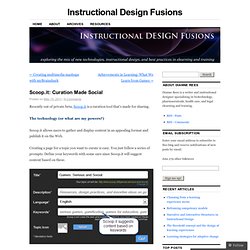
The technology (or what are my powers?) Scoop.it allows users to gather and display content in an appealing format and publish it on the Web. Creating a page for a topic you want to curate is easy. You just follow a series of prompts. Define your keywords with some care since Scoop.it will suggest content based on these. You can add the suggested content to your page, discard the content, or remove the source (if you don’t view it as reliable, for example). However, you also can add content you find on the internet using the Scoop.it bookmarklet. Office Timeline Download. Google Earth Basics. Beautiful web-based timeline software. Google+: The Dark Side of the Circle. Ira Socol is a graduate research and teaching assistant at Michigan State University.
He also blogs at SpeEd Change. Social networking sites like Google+ present powerful classroom opportunities, but they are also designed to create hierarchies. "Let's face it, [The Social Network] presented [Mark Zuckerberg] as a relentless bully with a computer instead of muscles. It also made Facebook's creation seem like a ploy to get back at a girl, rather than the simple desire to create. " -- Mike Eisenberg, ScreenRant True or not, the portrayal of the intentions behind the creation of Facebook-style social networking will seem logical to those who work among adolescents.
Flashcards - Leonor Cristina Santos on Diigo. Five Open Source Flash Card Apps to Make Rote Learning Easier. By Lisa Hoover - Sep. 14, 2009Comments (0) Chances are, when you've needed to learn something by rote memorization you've turned to flash cards (multiplication tables, anyone?).
There are plenty of ways to learn things that require instant recall but few are as effective as flash cards. The next time you need to memorize a bunch of facts, give one of these desktop and mobile open source flash cards applications a try. Anki - In addition to running on a desktop, you can also use this app on portable devices like mobile phones and the iPod touch.
It synchronizes across multiple machines so you can pick up right where you left off, and lets you share card decks so several people can access the same information at once. The Google+ Guide For Educators. Home » Education, Social Media Written by Grace2 August 2011 Unless you've been living under a rock the last month, undoubtedly you've heard of the new social networking site everyone has been raving about: Google+.
All this buzz has generated some great articles (my to-read pile just keeps growing!) Must Have Google Chrome Extensions. It's been some time since Google Chrome was first launched in 2008 and since has never looked back.
It has become popular incredibly fast and now has 20% of overall Internet users. Some of the reasons for the success of Google Chrome are fast browsing and launch speeds, faster development and ability to provide extensions. Although its speed is the real reason why people switch to Google Chrome, there are quite a huge number of extensions that changes the way you browse the web.
So here are some of the extensions you must have installed. Updated: 05 September 2011 1. Gmail Offline beta is a Gmail app built to support offline access, allowing mail to be read, responded to, searched and archived without network access. Slidestaxx - create amazing social media slideshows. Creative Commons License EXCEPT WHERE OTHERWISE NOTED, CONTENT ON THIS SITE ISLICENSED UNDER A CREATIVE COMMONS ATTRIBUTION-NON Commercial 3.0 LICENSEYOU MAY RE-USE THIS WITHOUT NEEDING TO ASK PERMISSION, AS LONG AS YOU CREDIT THE SOURCE IN WRITING AS EDUcationaltechnologyguy AND ON THE WEB BY ADDING A LINK BACK TO OUR WEB SITE, PLEASE DO NOT COPY ENTIRE ARTICLES.
YOU MAY ONLY USE THE TITLE, SUMMARY AND THEN LINK BACK. cOPYING ENTIRE ARTICLES IS PLAGIARISM. FileStork - request files from anyone using Dropbox. Dropbox is one of those services (free) I use all the time.
I have my important files backed up to Dropbox and synced between my home computer and school computer. I can also access these files from any web browser and my smartphone and tablet. I was using a service (Drop.io) in the past to have students send files to my Dropbox, but it shut down. Actas do 1º Congresso Nacional. How to Migrate from Facebook to Google+ If you have a lot of time and information invested in Facebook, it’s not easy moving to a new social network.

Here are a few tips on moving your information from your Facebook account to your shiny new Google+ account. Moving social networks isn’t the easiest thing to do, but luckily there are a few tools we can use to migrate pictures, videos, and friends. Wall posts and messages don’t make sense to migrate between networks so we are going to leave those out. Export Facebook Information Start by downloading all of your Facebook information. Google+ Tips And Tricks. Google+ For Educators. Google+: The Complete Guide. Using Google+? Add Mashable to your circles. You'll get the latest about new Google+ features and tips and tricks for using the platform as well as top social media and technology news.
Guide updated January 18, 2012 Google+: It's the hot social network on the block. In just a few months, Google's competitor to Facebook and Twitter has amassed more than 40 million users, and its growth hasn't stopped. Google+, however, isn't the easiest thing to understand. A recent change new and old Google+ users should take note of is Search Across Your World launched on Jan. 10, 2012. Facebook for Education. Embedit.in — Any file, in your website. Tips and Tricks. How to Get Started With Google+, Your Complete Guide. By now, you have all probably heard about the Google+ project , Google’s next attempt at making their network more social. Its goal is to make sharing online more like sharing in real life. If you haven’t gotten your invite just yet, you can in the following quick-look video, and by visiting the Google+ project overview , searchable details and discussion pages.
100+ Truques Google que o farão poupar tempo na sua Escola. 5 Fantastic Ways to Use Wallwisher in the Classroom. Google Apps for Education Guide to Going Google. Virtual Museums. O2 learn - Home. Moodle. Apps for Education - Perguntas comuns - Ajuda do Google Apps. Para se qualificarem ao uso do Google Apps for Education gratuito, é necessário que as organizações atendam a um dos seguintes critérios: Instituição de ensino básico ou instituição educacional superior, sem fins lucrativos, credenciada por uma instituição de reconhecimento geralmente aceita Organização americana, sem fins lucrativos, com status atual de 501(c)(3) e menos de 3.000 usuários. Observação: organizações americanas sem fins lucrativos com mais de 3.000 usuários são qualificadas para o Google Apps for Business com um desconto de 40%.
Inscreva-se aqui. Os grupos de estudantes/ex-alunos/pais, organizações religiosas, escolas domésticas ou instituições governamentais que não sejam registradas como 501(c)(3) não estão qualificadas para o Google Apps for Education. K-12 – Google Apps for Education. 37 Interesting Ways* to Use Search Engines in t... - "Google Docs" Bookmarks_1nov. ERTE/PTE. Moodle Colégio de Alfragide: Entrar no sítio. 69 Interesting Ways to Use Google Forms in the Classroom. Rickmansworth School Pupil Learning Experience (Yr 7-9)